TADA / TUNER
Tada! Tuner 아이콘

악기 튜너,
코드 연습과 악보 연주

마이크 하나로 시작하는 Android 연습 앱

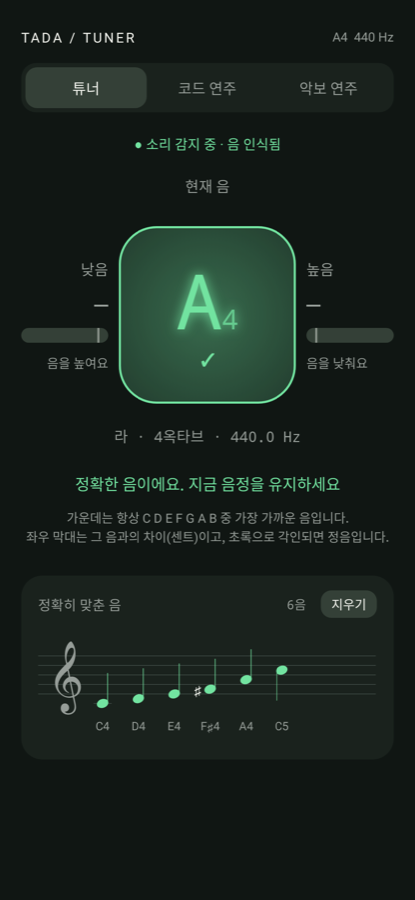
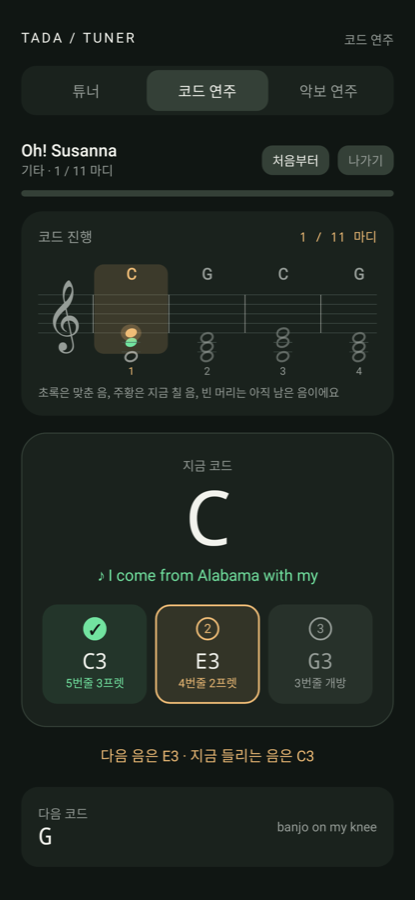
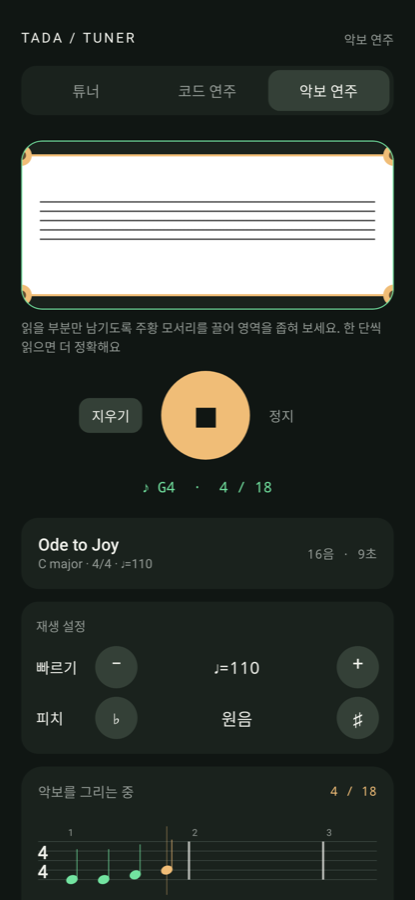
튜너 화면: 정음에 맞춘 A4 코드 연주 화면: 기타 C 코드 진행 악보 연주 화면: 인식한 악보를 연주하는 모습
TUNER

튜너

C D E F G A B 정음을 화면 가운데 고정하고 낮음·높음을 좌우 막대로 보여줍니다. ±10센트 안에 들어오면 화면에 각인되듯 표시되고, 맞춘 음이 아래 오선에 차례로 쌓입니다.

PLAY ALONG

코드 연주

Oh! Susanna, Amazing Grace, 환희의 송가를 기타·우쿨렐레·피아노로 따라 칩니다. 코드의 구성음을 한 음씩 확인하고, 코드 진행 오선에서 지금 칠 음과 진행 상황을 봅니다.

SHEET MUSIC프리미엄

악보 연주

악보를 찍으면 음표를 읽어 피아노로 연주합니다. 읽을 영역을 잘라 보내고, 음표를 올리고 내리거나 길이를 고치고, 빠르기와 피치를 바꿔 들은 뒤 사진·악보·음원을 저장할 수 있어요.

이렇게 써요

  1. 앱을 열고 마이크를 허용하면 튜너가 바로 듣기 시작합니다.
  2. 코드 연주 탭에서 곡과 악기를 고르고, 화면이 알려주는 줄과 프렛을 한 음씩 칩니다.
  3. 악보 연주 탭에서 악보를 찍고 재생을 누르면 인식된 음표가 그려지며 피아노로 연주됩니다.

자주 묻는 질문

무료인가요?

튜너와 코드 연주는 무료입니다. 악보 연주는 사진을 AI로 읽는 데 비용이 들어 월 구독으로 제공하며, Google Play에서 언제든 해지할 수 있습니다.

마이크 소리를 저장하나요?

아니요. 소리는 기기 안에서 실시간으로만 처리되며 녹음·저장·전송하지 않습니다.

악보 사진은 어디로 가나요?

선택한 영역이 Firebase를 통해 Google Gemini로 전송되어 음표를 읽는 데만 사용됩니다. 개발자는 사진을 보관하지 않습니다. 자세한 내용은 개인정보처리방침을 참고하세요.

어떤 악보를 잘 읽나요?

인쇄된 단선율 악보를 밝은 곳에서 정면으로 찍은 사진이 가장 잘 읽힙니다. 한 단씩 영역을 잘라 읽으면 정확도가 올라갑니다.

Tada! Tuner icon

Instrument tuner,
chord practice and sheet-music playback

An Android practice app that needs nothing but a microphone

Tuner screen locked on A4 Chord play-along screen with a guitar C chord Sheet music screen playing recognized notes
TUNER

Tuner

The nearest natural note (C D E F G A B) stays fixed in the centre while side bars show how flat or sharp you are. Land within ±10 cents and the note is stamped on screen, then collected on a staff below.

PLAY ALONG

Chord play-along

Play Oh! Susanna, Amazing Grace and Ode to Joy on guitar, ukulele or piano. The app checks each chord tone as you play it and shows your progress on a chord staff.

SHEET MUSICPremium

Sheet-music player

Photograph a score and hear it on a piano. Crop the part to read, nudge notes up or down, fix lengths, change tempo and pitch, then save the photo, notes and audio.

How it works

  1. Open the app and allow the microphone; the tuner starts listening right away.
  2. In Play Along, pick a song and an instrument, then play the strings and frets the screen points to, one note at a time.
  3. In Sheet Music, photograph a score and press play; the recognized notes are drawn as they are played on a piano.

FAQ

Is it free?

The tuner and chord play-along are free. Reading sheet music costs us per photo, so it is a monthly subscription that you can cancel any time in Google Play.

Do you record my microphone?

No. Audio is processed on your device in real time and is never recorded, stored or sent anywhere.

Where do my score photos go?

The region you select is sent through Firebase to Google Gemini solely to read the notes. We keep no copies. See the privacy policy.

Which scores read best?

Printed single-line melodies photographed straight on in good light. Cropping one staff system at a time improves accuracy.